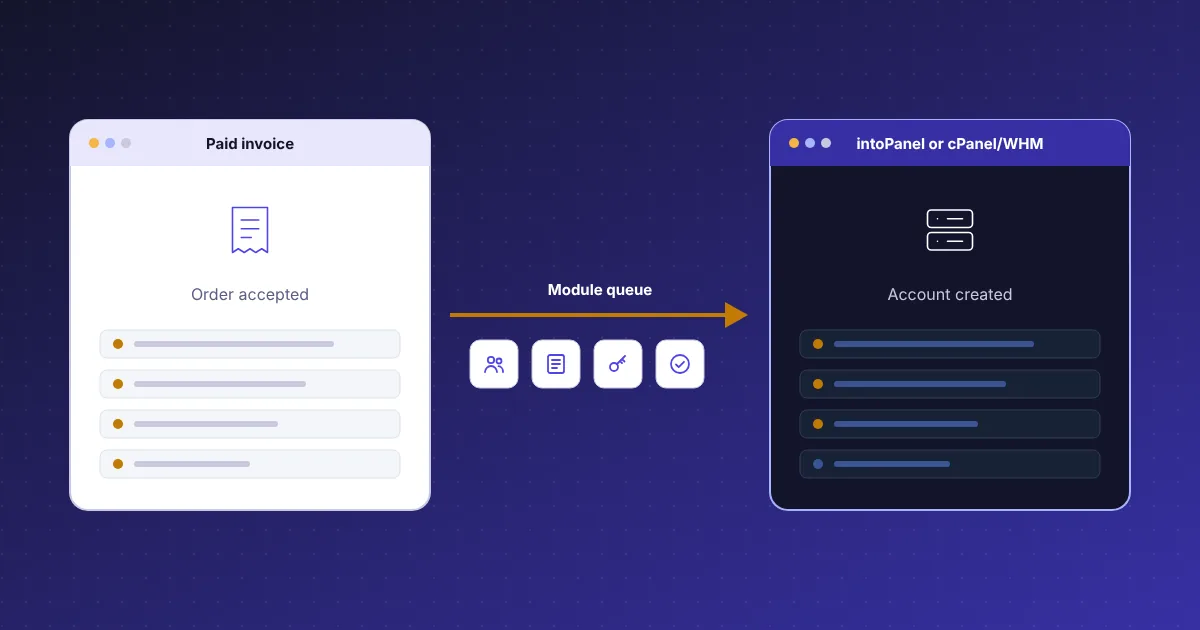
Server groups and automatic account placement
Provisioning starts with Settings > Servers. Each server has a name, an address, the module it runs, the port and the token that module needs, and a test button that proves CoreInto can reach it before any client depends on it. The intoPanel module talks to /api/v1 on port 7443 with a Bearer token; the cPanel & WHM module uses a WHM API 1 token on port 2087. Reading the packages from a server is part of the same page, so the package names a product uses are chosen from a list rather than typed.
Servers are collected into groups, and a product points at a group rather than a single machine. When an account is created, CoreInto picks a server in the group, which is how a hosting company adds a second or third server without touching its products: add the server, put it in the group, and new orders start landing there. A reseller product can use a different group from a shared one, and a VPS or dedicated product can use no server at all.
The server page also records what the server reports. Disk and bandwidth read through the module appear on each service page, for staff and for the client, and the module log under the logs keeps every call made to every server with secrets hidden, so a failed creation can be traced to the server's exact answer. Because the tokens are encrypted with the key kept in your configuration file, a copy of the database on its own does not give away access to your servers, and renaming the admin folder and requiring two-step sign-in for staff keeps the pages that hold them behind a second barrier.
intoPanel and cPanel & WHM modules: what each one does
Both server modules implement the same list of actions, so a product behaves the same way whichever panel sits behind it. Test confirms the connection and credentials. Read packages lists the hosting packages defined on the panel so a product can be matched to one. Create makes the account with the username, password, domain and package from the order. Suspend takes a reason and shows it on the client's service page; unsuspend reverses it. Terminate removes the account. Change package applies an upgrade or downgrade. Change password passes a new password set by the client or staff to the panel. Read disk and bandwidth fetches usage for the service page, and sign in to the panel opens the client's control panel from CoreInto.
The intoPanel module speaks to CoreInto's sister panel for AlmaLinux through its /api/v1 interface with a Bearer token on port 7443. The cPanel & WHM module speaks WHM API 1 with a token on port 2087, so an existing cPanel server joins CoreInto by creating an API token in WHM and pasting it on the server page. Nothing is installed on the server for either module.
Setting a product up to use a module is a short section of the product's settings: pick the module, pick the server group, choose the package by name from the list the module read, and decide when the account is created. A product that sells software rather than hosting uses the Licensing Manager module in the same place, and CoreInto issues a licence key instead of calling a server. Products that need no automation, such as a dedicated server set up by hand, use no module, and staff mark the service active when the work is done.
Automatic account creation on order, payment or acceptance
When an account is created is a product-level choice, and each option suits a different business. Create on order makes the account the moment the order is placed, which is right for free products and for trials where speed matters more than the risk of a non-paying signup. Create on payment waits until the first invoice is paid, the choice most hosting companies make because the account exists only once money has arrived. Create on acceptance leaves the decision to a staff member, who reviews the order, perhaps after a fraud check, and accepts it; the order page offers to create the accounts on the server at the same time.
The order page is where staff see the whole picture: the products with their options and add-ons, domains to register or transfer, the invoice, the client and the fraud check result, with actions to accept, cancel or mark the order as fraud. Order statuses are configurable, and order emails tell the client what happened at each stage from a template you can edit.
Creation itself is one module call. CoreInto generates the username and password, chooses a server in the product's group, sends the create action with the package name, and on success marks the service active and sends the welcome email with the sign-in details. On failure the action goes to Pending Module Actions and the service stays pending, so the client is not told their account is ready until it is. Staff can retry from the queue once the server answers, or create the account by hand on the server and mark the service active, and the module log shows exactly what the server said when the first attempt failed.
Suspend with a reason and unsuspend on payment
Suspension in CoreInto always carries a reason. When the daily run suspends a service for an unpaid invoice, the reason says so, and the client sees it on their service page beside a button that leads to the unpaid invoice; My Services opens with tiles for active, pending and suspended services and a notice when anything is suspended. Staff who suspend by hand type their own reason, whether for abuse, a chargeback or a request from the client, and the same reason appears to the client and in the activity log.
The module does the work on the panel. Suspend is passed to intoPanel or WHM with the reason, so the panel's own suspension page shows why the account is off, and the account's sites and mail stop answering as the panel decides. Unsuspend is the mirror action, called when the invoice is paid, whether by card capture, a gateway, credit or a payment recorded by staff. There is no ticket, no delay beyond the module call, and the client gets the unsuspension email from its template.
Timing comes from Automation Settings: the number of days after the due date at which an unpaid service is suspended, and the later day on which it is terminated. The suspension and termination tasks appear on Automation Status with their last run. Where a server cannot be reached at that moment, the action waits in Pending Module Actions and is retried, so a server reboot during the nightly run does not leave a client's account in the wrong state. Settings that govern services and emails about services are documented in the manual's Services and servers chapter, so the exact messages a client receives at each step can be reviewed before you go live.
Upgrades, downgrades and change package with proration
A client who outgrows a plan should be able to move up without a ticket, and CoreInto handles this with upgrade and downgrade paths. Each product lists the products a client may move to, and the client's service page offers those as upgrade options. Choosing one creates an invoice for the difference, prorated for the time left in the current term, and paying it calls change package on the module so the panel applies the new package to the existing account with its files and mail untouched.
Configurable options and add-ons follow the same route. A product with options, say disk space or the number of databases, lets the client change an option from the service page, and the price difference is prorated on an invoice. Service add-ons under Clients > Service Add-ons are extra billable items attached to a service, with their own terms and prices, and staff can add or remove them. Bundles sell several products together at one price, and stock control shows how many are left and marks a product “Out of stock” at zero, which matters for dedicated servers and other limited items.
Renewal dates and proration are described in the Billing chapter, and the rule is simple: the service keeps its due date, and a change in the middle of a term is charged for the remaining fraction. Staff can also change the package from the admin service page, with or without an invoice, which is the usual way to honour a free upgrade. The module log records the change package call and the server's answer, and the service's product and price are updated so the next renewal invoice is for the new plan.
Fixed terms, cancellation requests and termination
Most hosting services renew until someone stops them, but some should end on a date. A fixed-term service runs for its term and is then terminated by the daily run rather than invoiced again, which suits a project site, a trial that must not become a subscription, or a contract with an agreed end. The service page shows the end date to the client and to staff, and the emails about services tell the client before it arrives.
Cancellation requests are how clients end a service themselves. From the service page a client asks for cancellation either immediately or at the end of the current term, with a reason. The request appears under Clients > Cancellation Requests for staff to see and, where the product allows, is carried out automatically: an immediate request terminates through the module and marks the service cancelled, an end-of-term request stops the renewal invoice from being generated and terminates when the term ends. Staff can also cancel a service from the admin page at any time.
Termination is the module action that removes the account from the server, and CoreInto treats it carefully. It happens at the end of a cancellation, at the end of a fixed term, or when an unpaid service passes the termination period set in Automation Settings; the invoice for a terminated unpaid service is cancelled so the client's account does not carry a debt for a product they no longer have. The service is marked terminated rather than deleted, so its history, invoices and tickets remain on the client page, and the module log shows the terminate call and the server's answer.
Pending module actions queue and the module log
Servers are not always reachable at the moment CoreInto needs them. Rather than fail the order or leave a client suspended, every module action that cannot be completed is placed in Utilities > Pending Module Actions. The queue lists the service, the action, when it was first attempted and the server's last answer, and the frequent tasks of the cron job retry it on each run. Staff can open the queue, run an action again now, or remove an action that should not happen because the matter was handled another way.
Automation tasks that touch services are listed in the manual's Services and servers chapter, and they all go through the same queue: creation after payment, suspension and termination for non-payment, change package after an upgrade invoice is paid, and termination at the end of a term. Because the queue is shared, a server outage during the nightly run produces a list of waiting actions rather than a list of complaints, and a staff member can see at a glance what will happen when the server returns.
The module log is the other half. Every call to every server, whether it succeeded or failed, is recorded with the action, the service, the server, the time and the answer, and secrets such as tokens and passwords are hidden in the record. It sits alongside the activity, email, gateway, API and admin logs, so a client's question about why their account was unavailable can be answered from the records rather than from memory. Staff can also run any action by hand from the admin service page, and that call is logged the same way.
Products with configurable options, add-ons, bundles and stock
Automation is only as good as the catalogue behind it. Settings > Products/Services holds product groups and products of several kinds: shared hosting, reseller, VPS or server, software licence and other. Each product carries per-term prices from monthly to triennial, one-time or free, a setup fee, the module and server group it provisions on, and whether it is featured in the store. Free domain with hosting is set here, as are the upgrade and downgrade paths and the stock count.
Configurable options let one product cover several sizes. An option such as disk space, number of websites or backup frequency has choices with their own prices, and the client picks at checkout; the choice is recorded on the service and passed to the module where the panel package depends on it. Product add-ons are separate billable items sold with a product, such as a dedicated IP address or a priority support plan, with their own terms and prices. Bundles put several products together at a bundle price so a hosting plan and a licence can be sold as one order.
Promotions and stock complete the picture. Promotions apply a discount by code or automatically, with the usual limits on products, terms and dates. Stock control sets a count on a product and removes it from the store when the count runs out, which prevents selling a dedicated server you do not have. The store itself is the client's view of all this: groups as menu entries, products with their prices per term, a cart that holds products and domains together, and checkout that creates the order the automation then carries through to a working account.